
Cisco Switches Explained: Types, Use Cases, and Network Design Basics
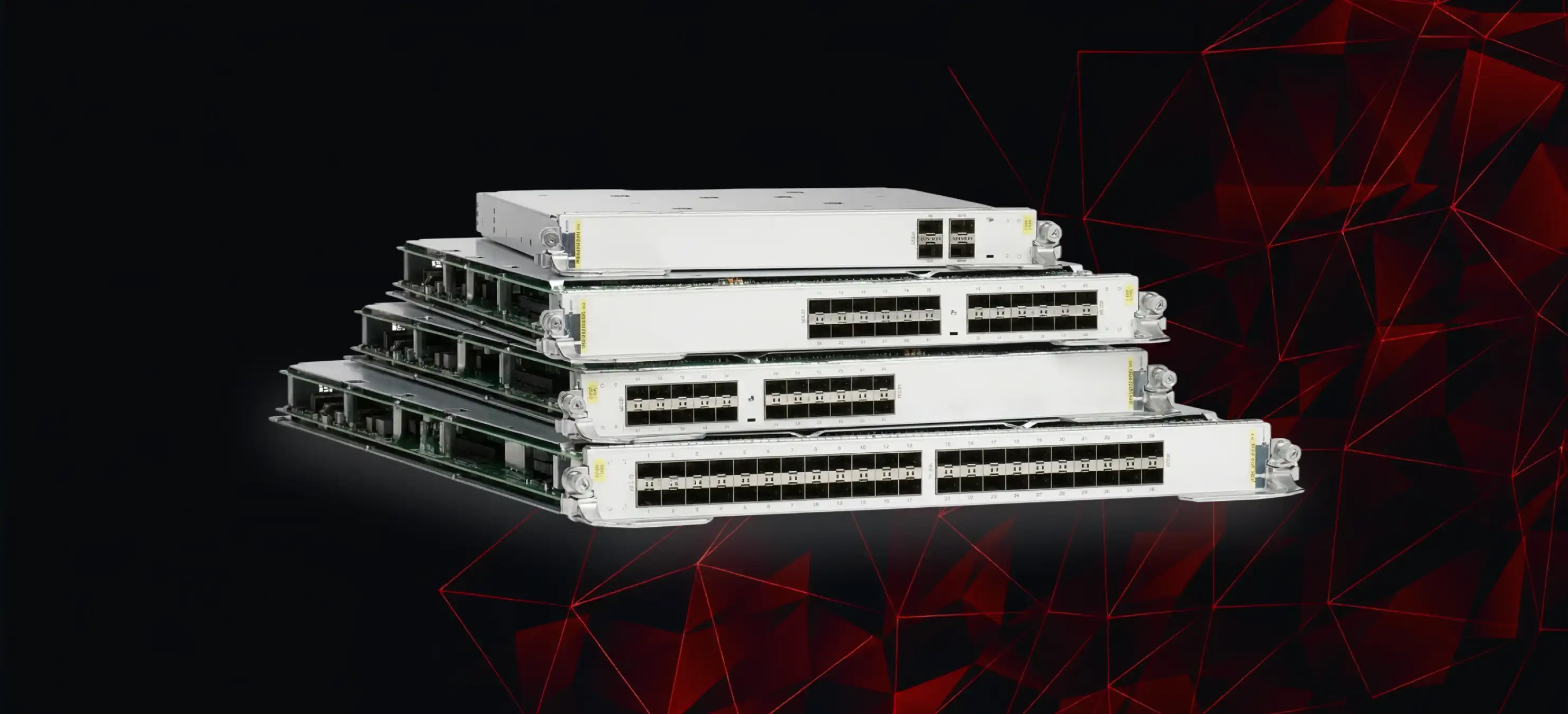
Learn how Cisco switches work, including access, aggregation, and core switch types, common use cases, and best practices for building reliable enterprise networks.
Introduction: Why Reliable Networking Matters Now More Than Ever
In a world where cloud apps, remote work, video conferencing, and data-heavy workflows have become the norm, a robust and secure network is no longer a luxury it’s a foundation. The performance, resilience, and security of your network depend heavily on one category of equipment: switches. Among all brands, Cisco switches are widely regarded as the gold standard for enterprise-grade networking due to their reliability, scale, lifecycle support, and security features.
Whether you manage a fast-growing SMB network, a content delivery environment, or a complex data center fabric, Cisco’s portfolio especially high-density 10G/100G modules can deliver the throughput and uptime your users expect. In this guide, you’ll learn what networking switches do, why Cisco dominates, how to choose the right model, and when to complement your deployment with KVM switches (including dual monitor KVM switches, KVM extenders, and insights into the best KVM switch for different use cases).
We’ll also spotlight top Cisco modules available from ITD Bay in the USA, so you can research, shortlist, and purchase with confidence:
- Cisco A9K-36X10GE-SE
- Cisco A9K-24X10GE-SE
- Cisco A9K-2X100GE-SE
- Cisco A9K-36X10GE-TR
- Cisco A9K-24X10GE-TR
What Is a Networking Switch? (And Why It’s Essential)
A networking switch is a device that connects multiple endpoints computers, servers, wireless access points, security appliances, cameras within a Local Area Network (LAN). It forwards frames intelligently using MAC addresses, which minimizes unnecessary broadcast traffic and optimizes network efficiency. Unlike hubs (which simply replicate traffic to all ports) or basic unmanaged splitters, modern managed switches can segment traffic (e.g., VLANs), apply Quality of Service (QoS) for voice/video, enforce access control, and enable link aggregation for higher throughput and redundancy.
Why Organizations Depend on Switches
- Performance: Switches improve throughput by forwarding traffic only where it needs to go, reducing collisions and congestion.
- Security: With ACLs, 802.1X, private VLANs, port security, and segmentation, switches act as a first line of defense.
- Scalability: Modular or stackable architectures allow your network to grow organically.
- Visibility & Control: Managed switches provide telemetry, logs, and policy control for secure, reliable operations.
Why Cisco Switches Dominate the Market
Cisco earned its reputation by building resilient systems designed for mission-critical uptime, backed by mature software, rich telemetry, and a vast ecosystem of integrations and support.
Key Advantages
-
High Reliability & Uptime
Carrier-grade hardware, redundant components, hot-swappable line cards, and mature OS images give Cisco a proven uptime profile. -
Advanced Security Built-In
Role-based access, TACACS+/RADIUS integration, MACsec on select platforms, TrustSec (on applicable models), and granular ACLs reduce risk exposure. -
Scalability from Edge to Core
Cisco solutions cover small edge switches to massive core/aggregation chassis and data center fabrics, letting you standardize across tiers. -
Operational Consistency
Familiar CLIs, robust APIs, and management platforms streamline configuration across large fleets. -
Lifecycle Support & Community
Long support windows, global spares availability, and an active community reduce total cost of ownership (TCO) over time.
Types of Cisco Switches (And Where They Fit)
Switches vary by management, power, layer of operation, and form factor. Understanding these distinctions helps you match gear to requirements:
Managed vs. Unmanaged
- Managed switches: Offer VLANs, QoS, routing (Layer 3 models), SNMP, NetFlow/telemetry, security controls, and automation hooks (e.g., Ansible, APIs). Ideal for business networks.
- Unmanaged switches: Plug-and-play. Minimal configuration. Suitable for small, simple environments.
PoE/PoE+ and UPOE
- Power over Ethernet lets a switch power phones, cameras, APs, and sensors without local power bricks. Reduces cabling costs and centralizes power design.
- Use cases: IP surveillance, VoIP, Wi-Fi deployments, smart buildings.
Layer 2 vs. Layer 3
- Layer 2 (L2): Switching and VLAN segmentation at the data link layer.
- Layer 3 (L3): Adds inter-VLAN routing, dynamic routing, ACLs at the IP layer—often necessary for campus cores and larger branch sites.
Fixed vs. Modular
- Fixed: Fixed port counts (e.g., 24/48-port copper or SFP). Cost-effective for edge.
- Modular: Chassis + line cards for flexible scale and mixed media. Popular in aggregation/core roles and service provider environments.
Spotlight: Cisco A9K Series Modules Available at ITD Bay
The following Cisco A9K modules are designed for high-density 10G and 100G deployments, commonly used in service provider, metro, and data center aggregation roles. They deliver line-rate performance, large buffers, advanced QoS, and robust reliability for traffic-heavy environments.
Tip: If you’re upgrading backbone links, content distribution, or multi-tenant aggregation, these modules are prime candidates.
1) Cisco A9K-36X10GE-SE — 36-Port 10GE, Scale & Efficiency
Product: A9K-36X10GE-SEWhy it stands out:
- High-density 36 × 10 Gigabit Ethernet ports per module for dense aggregation.
- “SE” variant (often associated with scale-optimized/efficiency-focused versions) is ideal for large L2/L3 service aggregation with stringent SLAs.
- Suitable for metro Ethernet, data center leaf/aggregation, and edge deployments needing consistent line-rate forwarding.
Use cases: High-performance campus/core uplinks, ISP access aggregation, regional PoPs.
2) Cisco A9K-24X10GE-SE — 24-Port 10GE, Scale with Flexibility
Product: A9K-24X10GE-SE
Why it stands out:- 24 × 10GE ports per module—balanced density when you need scale plus room for future growth.
- Efficient for enterprise cores and service provider edges where capacity is rising but not yet maxed.
Use cases: Consolidating medium-large site uplinks, multi-tenant environments, and staged migrations to higher density.
3) Cisco A9K-2X100GE-SE — 2-Port 100GE, Backbone-Ready
Product: A9K-2X100GE-SE
Why it stands out:- 2 × 100 Gigabit Ethernet ports for backbone or core interconnects.
- Ideal for high-throughput backhaul, data center interconnect (DCI), and content delivery networks.
Use cases: Interconnecting core chassis, DCI between facilities, ISP peering links.
4) Cisco A9K-36X10GE-TR — 36-Port 10GE, Throughput & Resilience
Product: A9K-36X10GE-TR
Why it stands out:- High-density 36 × 10GE ports similar to SE but “TR” variant (commonly associated with throughput/resiliency emphasis) aligns with traffic-heavy environments.
- Great for low-latency forwarding and consistent performance under load.
Use cases: ISP aggregation layers, streaming media delivery, CDN nodes.
5) Cisco A9K-24X10GE-TR — 24-Port 10GE, Performance with Headroom
Product: A9K-24X10GE-TR
Why it stands out:- 24 × 10GE ports with “TR” focus—optimized balance between performance and density in evolving networks.
- Perfect if you want enterprise-grade performance with room to scale toward denser configurations later.
Use cases: Campus distribution/core, regional aggregation, hybrid cloud uplinks.
The A9K modules above are commonly deployed in Cisco ASR 9000 series chassis. Ensure compatibility with your specific chassis model, software version, power/cooling capacity, and fabric bandwidth.
How to Choose the Right Cisco Switch (Practical Buying Guide)
Selecting the right switch or module depends on several dimensions:
1) Capacity & Port Density
- Current and projected 10G/100G port needs.
- Consider oversubscription, peak traffic patterns, and growth over the next 3–5 years.
2) Throughput & Buffering
- For video, large data transfers, and east–west traffic, ensure line-rate performance and sufficient buffers to prevent microbursts and packet loss.
3) Layer & Features
- Layer 2 for access/segmentation; Layer 3 for inter-VLAN routing and dynamic routing protocols (OSPF, BGP, etc., where applicable).
4) Power & Cooling
- High-density line cards demand appropriate power budgets and airflow. Verify rack conditions and DC/AC availability.
5) Resiliency
- Redundant supervisors, power supplies, fans; hot-swappable modules; ISSU/NSF capabilities (platform dependent).
6) Operations & Tooling
- Do you need NetFlow, model-driven telemetry, API automation, or centralized management? Align with your tooling strategy.
7) Budget & TCO
- Consider not just the upfront cost, but support
contracts, spares, and operational overhead over the
lifecycle.
KVM Switches: What, Why, and How (Complete Guide)
While Cisco switches move packets and frames across your network, KVM switches simplify server and multi-PC control for admins, engineers, and creators. Integrating the right KVM switch into your rack or workstation can dramatically streamline workflows.
What is a KVM switch?
A KVM switch (Keyboard, Video, Mouse) is a hardware device that lets you control multiple computers or servers with a single keyboard, monitor, and mouse. Instead of juggling peripherals or remote sessions, you physically switch control between machines.
What does a KVM switch do?
- Consolidates your keyboard, display, and mouse across several systems.
- Lets you toggle control through buttons, hotkeys, or on-screen displays.
- Reduces cable clutter and speeds up hands-on tasks (BIOS access, OS installs, troubleshooting).
What is a KVM switch used for?
- Data centers & server rooms: BIOS-level access, OS deployments, emergency troubleshooting.
- NOCs & labs: Quick context-switching across test benches and monitoring systems.
- Creative & engineering workstations: Switch between render box, edit station, and dev PC.
- Secure environments: Hardware isolation without network dependencies.
How does a KVM switch work?
- Each target machine connects to the KVM via video (HDMI/DP/DVI/VGA), USB (keyboard/mouse), and sometimes audio.
- The KVM presents a single set of peripherals and routes signals to the selected system.
- Advanced models support USB emulation for seamless hotkey switching, EDID retention to prevent display re-enumeration, and peripheral switching for webcams or headsets.
Why you need a KVM switch
- Efficiency: Save desk space and time; no need to physically move inputs or rely solely on remote tools.
- Resilience: If a machine loses network, you still have direct control.
- Security: Hardware-level separation can complement or replace remote-control software.
Best KVM switch: what to look for
- Number of ports: From 2-port desktop units to 8/16/32-port rackmount models.
- Resolution & refresh: 4K 60Hz, 3440×1440 ultrawide, or 1080p at high refresh depending on your use case.
- USB types: USB 2.0 for HID, USB 3.x for high-speed peripherals (drives, webcams).
- Audio & mic: For conferencing or production workflows.
- EDID & hotkey behavior: To avoid monitor “blinks” and input lag.
- Security features: For government/finance, look for secure KVMs with data path isolation.
Dual monitor KVM switch
If your workflow relies on two displays per machine, get a dual monitor KVM switch. Check:
- Video format consistency (e.g., dual DisplayPort).
- Bandwidth for your resolution/refresh (e.g., dual 4K@60Hz).
- Whether the KVM keeps EDID consistent to prevent window reshuffling.
KVM extenders
A KVM extender uses Cat6 or fiber to carry keyboard, video, and mouse signals from a server room to a desk (or vice versa), often up to hundreds of meters. Useful when:
- You need noisy, heat-generating systems away from users.
- You want secure operator consoles in a different physical area.
- You require distance beyond standard cable limits.
What is the biggest KVM port switch made in USA?
Vendors offer enterprise-grade KVMs with 32, 48, or more ports; some modular platforms can scale even higher. While exact “biggest” claims vary by manufacturer and model, planning typically revolves around 32-port blocks per 1U/2U chassis for dense server rooms. For compliance-driven environments, consider TAA-compliant or NIAP-certified secure KVMs sourced from U.S.-based suppliers.
Network Architecture Best Practices (That Pay Off Fast)
1) Design for Segmentation
- Use VLANs to separate users, servers, VoIP, IoT, and guest traffic.
- Apply ACLs and private VLANs to restrict lateral movement.
2) Prioritize QoS
- Classify voice/video and apply priority queues.
- Rate-limit or shape bulk traffic where needed.
3) Build Redundancy
- Dual-homing critical uplinks, link aggregation (LACP), and redundant supervisors/power.
- Spanning Tree best practices or modern L2/L3 designs to avoid loops and single points of failure.
4) Monitor Everything
- Enable telemetry/NetFlow/sFlow, SNMP traps, and syslog.
- Set alerts for link flaps, CRC errors, temperature thresholds, and CPU/memory spikes.
5) Secure by Default
- Disable unused ports, MAC limiting, 802.1X where feasible.
- Management plane protection: out-of-band management, SSH only, strong AAA, and role-based access.
6) Plan Power & Cooling
- High-density 10G/100G modules demand careful power budgeting and airflow design.
- Keep hot/cold aisle discipline in racks.
- Cisco vs. Other Vendors: Key Differentiators
While alternatives exist, Cisco stands apart on:
- Ecosystem depth: Broadest range from access to core and security to DC fabric.
- Mature OS & features: Rich L2/L3, policy, and automation options.
- Support & longevity: Extensive documentation, TAC support, and long hardware lifecycles.
- Resale value & parts availability: Easier to source spares and scale consistently across sites.
- Real-World Deployment Scenarios
1) Campus Core with 10G Uplinks
An enterprise with multiple buildings and dense Wi-Fi might use 24–36×10GE modules to aggregate access switches and backhaul to a central core with 100GE interconnects. QoS prioritizes collaboration apps; VLANs separate staff/guest/IoT; Layer 3 handles east–west routing efficiently.
2) Service Provider Edge
Regional ISPs often deploy 36×10GE (TR/SE) to consolidate customer links, apply policy/QoS, and hand off to the backbone via 2×100GE. Buffering and line-rate performance ensure consistent experience during peak hours.
3) Content Delivery / Media
CDN nodes rely on ultra-consistent 10G line-rate forwarding to avoid packet loss. TR-focused modules are popular for their throughput consistency under stress and their ability to push multimedia traffic reliably.
Where to Buy Cisco Switches Online in the USA (ITD Bay)
When you’re ready to purchase, choose a vendor that provides authentic hardware, competitive pricing, fast shipping, and expert support. At ITD Bay, we stock the A9K modules featured in this guide and can help you validate compatibility, capacity planning, and deployment nuances:
- Cisco A9K-36X10GE-SE
- Cisco A9K-24X10GE-SE
- Cisco A9K-2X100GE-SE
- Cisco A9K-36X10GE-TR
- Cisco A9K-24X10GE-TR
Why buy from ITD Bay:
- Genuine Cisco modules for reliable production networks.
- Fast delivery across the USA to minimize downtime.
- Knowledgeable support for pre-sales sizing and after-sales assistance.
- FAQs: Cisco & KVM Switches
Q1: What is a KVM switch?
A KVM switch lets you control multiple computers using a single keyboard, video display, and mouse, switching between systems via a button, hotkey, or OSD.
Q2: Why you need a KVM switch?
To reduce desk/rack clutter, speed up hands-on operations (like BIOS access), maintain control when the network is down, and improve security by avoiding remote-control software where inappropriate.
Q3: How does a KVM switch work?
It routes keyboard, video, and mouse signals to one selected computer at a time. Advanced units preserve monitor EDID and emulate USB to make switching seamless.
Q4: What does a KVM switch do in practice?
It centralizes control for admins, engineers, and creators—making context-switching fast and reliable, especially for labs, server rooms, and dual-system desks.
Q5: What is a KVM switch used for (top use cases)?
Data centers, network operation centers, editing suites, developer workbenches, secure environments, and any multi-PC workstation.
Q6: What is the biggest KVM port switch made in USA?
Enterprise KVMs commonly offer 32+ ports, with some modular systems scaling further. For U.S.-sourced or TAA-compliant secure KVMs, check vendor certifications and current availability.
Q7: What is a dual monitor KVM switch and who needs it?
A dual monitor KVM controls two displays per system—ideal for trading desks, NOCs, content creation, and engineering. Verify bandwidth for dual 4K@60 or your target resolution/refresh.
Q8: Are Cisco A9K modules right for SMBs?
They’re generally aimed at service provider, metro/aggregation, and data center roles. For SMB access layers, consider fixed-configuration Catalyst/Meraki. Use A9K where you need dense 10G/100G and carrier-grade reliability.
Q9: Do Cisco switches support PoE for cameras and phones?
Many Cisco access/campus switches support PoE/PoE+. The A9K modules highlighted here focus on 10G/100G aggregation rather than PoE access.
Q10: How should I size for growth?
Project ports and throughput 3–5 years out. Add a 20–30% headroom buffer for unexpected projects, new apps, and bursty traffic patterns.
-
RECENT BLOG POSTS
CATEGORIES
- Laptop Comparisons
- Cisco Switches
- Laptop Comparisons
- Cisco Switches
Contact Us
Send us a Message
Fill out the form below to get started, and a member of our team will contact you as soon as possible