
Network Switch vs Router vs Hub: Key Differences Explained
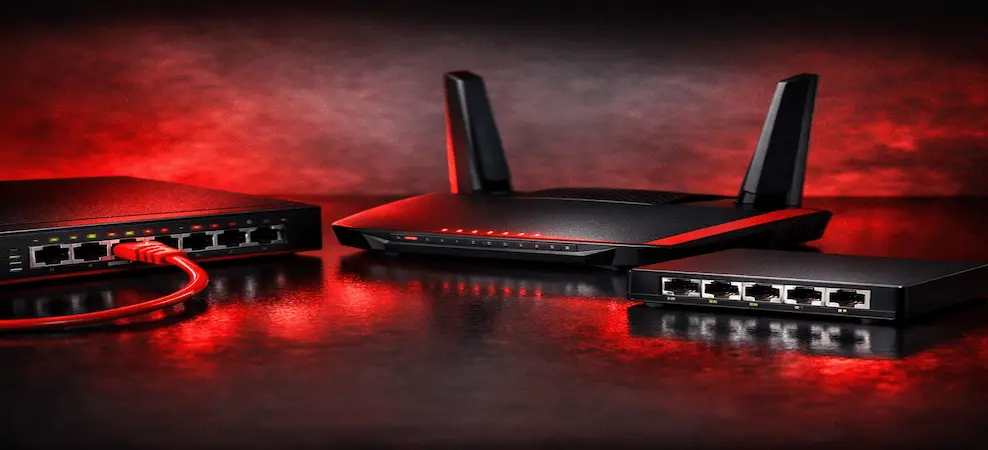
Learn the difference between network switches, routers, and hubs to choose the right device for your network.
Introduction to Networking Devices
Whether you are setting up a home office, managing a small business network, or building enterprise infrastructure, understanding the difference between a network switch, router, and hub is essential. These networking devices may look similar at first glance, but they serve completely different purposes. Choosing the right device can significantly improve network speed, security, reliability, and scalability.
Think of a network as a transportation system. A router acts like a highway interchange connecting different cities, a switch functions like a traffic controller directing vehicles to the correct destination, and a hub resembles a loudspeaker broadcasting information to everyone regardless of who actually needs it. Understanding these distinctions helps organizations avoid bottlenecks, improve productivity, and maximize network efficiency.
Modern businesses rely heavily on high-performance networking equipment due to increasing demands from cloud computing, remote work, artificial intelligence applications, video conferencing, and connected devices. According to recent industry reports, the global Ethernet switch market continues to experience substantial growth as enterprises upgrade infrastructure to support data-intensive workloads and AI-driven applications. This trend highlights the growing importance of selecting the right networking hardware for current and future requirements.
What Is a Network Switch?
A network switch is a device that connects multiple devices within the same Local Area Network (LAN). Unlike older networking technologies, a switch intelligently forwards data only to the intended recipient rather than broadcasting it across the entire network. When combined with the right networking switches accessories, such as transceivers, Ethernet cables, and power supplies, network switches can deliver enhanced performance, reliability, and scalability for business and enterprise environments.
Switches operate primarily at Layer 2 of the OSI model, using MAC addresses to identify connected devices. Advanced Layer 3 switches can also perform routing functions, making them highly versatile in enterprise environments. When a computer sends data to another device on the network, the switch examines the destination address and forwards the data directly to that device.
This intelligent communication dramatically reduces unnecessary traffic and improves network efficiency. In a busy office with dozens or hundreds of connected devices, switches help maintain high performance by ensuring that network resources are used effectively. Modern switches also support advanced features such as VLANs, Quality of Service (QoS), Power over Ethernet (PoE), link aggregation, and network monitoring.
How a Network Switch Works
A switch learns the MAC addresses of connected devices and stores them in a forwarding table. When a packet arrives, the switch checks the destination address and sends the packet only to the appropriate port.
This targeted communication offers several benefits:
- Reduced network congestion
- Faster data transmission
- Better bandwidth utilization
- Improved overall performance
- Enhanced reliability
Key Features of a Network Switch
- Direct communication between devices
- Intelligent packet forwarding
- High-speed connectivity
- VLAN support
- Enhanced network efficiency
- Scalability for growing organizations
Browse enterprise networking switches for high-performance solutions.
What Is a Router?
A router is a networking device that connects multiple networks together and directs traffic between them. The most common example is connecting a local network to the Internet.
Routers operate at Layer 3 of the OSI model and use IP addresses to determine the best path for data transmission. Every time a user opens a website, streams a video, or accesses cloud applications, a router plays a crucial role in directing that traffic between the local network and external destinations.
Modern routers have evolved far beyond simple traffic forwarding devices. Many include integrated firewalls, VPN support, wireless connectivity, traffic management, parental controls, intrusion detection, and advanced security features. These capabilities make routers the foundation of internet connectivity for homes, businesses, schools, and data centers.
How a Router Works
Routers analyze destination IP addresses and determine the optimal route for delivering data. They maintain routing tables that help identify the most efficient path between networks.
Key router responsibilities include:
- Assigning IP addresses through DHCP
- Managing internet access
- Routing traffic between networks
- Providing firewall protection
- Supporting wireless connectivity
Key Features of a Router
- Connects networks together
- Internet access management
- Built-in security features
- Wireless networking support
- VPN capabilities
- Traffic prioritization
What Is a Hub?
A hub is one of the oldest networking devices and is considered largely obsolete in modern networking environments. Unlike switches and routers, hubs lack intelligence and simply broadcast incoming data to every connected device.
Imagine standing in a crowded room and shouting a message to everyone, even though only one person needs to hear it. That is essentially how a hub operates. Every device connected to the hub receives every transmission, regardless of whether it is the intended recipient.
While hubs were once popular due to their simplicity and low cost, they create significant performance and security issues. As network traffic increases, collisions become more common, leading to slower communication and reduced efficiency.
How a Hub Works
When a hub receives data from one device, it sends that data to all connected ports simultaneously. Each device must inspect the data and determine whether it is intended for them.
This approach leads to:
- Excessive traffic
- Increased collisions
- Lower efficiency
- Reduced security
- Poor scalability
Key Features of a Hub
- Simple plug-and-play operation
- Low initial cost
- No configuration required
- Broadcast communication
- Limited functionality
Hubs have largely been replaced by switches in modern networks.
Network Switch vs Router vs Hub: Key Differences
The easiest way to understand these devices is through direct comparison.
| Featureh | Switc | Router | Hub |
| Primary Function | Connects devices within a LAN | Connects multiple networks | Connects devices through broadcasting |
| Data Handling | Sends to a specific device | Routes between networks | Sends to all devices |
| OSI Layer | Layer 2/3 | Layer 3 | Layer 1 |
| Performance | High | High | Low |
| Security | Moderate to High | High | Very Low |
| Intelligence | Smart | Smart | Basic |
| Scalability | Excellent | Excellent | Poor |
| Modern Usage | Widely Used | Essential | Rarely Used |
Performance Differences
Switches deliver superior LAN performance because they forward traffic only where needed. Routers provide efficient communication between networks and the internet. Hubs generate unnecessary traffic, reducing performance as more devices are added.
Security Differences
Routers generally provide the highest level of security through firewalls, access controls, and traffic filtering. Managed switches offer VLAN segmentation and monitoring capabilities. Hubs provide almost no security because all traffic is visible to every connected device.
Cost and Scalability Differences
While hubs may appear cheaper initially, their limitations often lead to higher long-term costs. Switches and routers offer significantly better scalability and support future network growth.
When to Use a Network Switch
A network switch is the ideal solution when multiple devices need to communicate efficiently within the same network. Businesses rely heavily on switches because they provide reliable, high-speed communication while minimizing congestion.
Common use cases include:
- Corporate office networks
- Data centers
- Manufacturing facilities
- Security camera systems
- Educational institutions
- Healthcare environments
Switches are particularly valuable in environments where large volumes of data move between servers, workstations, printers, storage devices, and IP cameras. As organizations continue expanding their digital infrastructure, switches remain one of the most critical components of network architecture.
When to Use a Router
A router becomes essential whenever internet connectivity or communication between multiple networks is required. Without a router, devices on a local network cannot efficiently access external resources.
Typical router applications include:
- Home internet networks
- Business internet gateways
- Branch office connectivity
- VPN deployments
- Multi-site networks
Modern routers also support advanced technologies such as SD-WAN, Zero Trust security frameworks, cloud integration, and AI-driven traffic optimization. These features make routers indispensable for organizations seeking secure and reliable connectivity.
When to Use a Hub
Although hubs are rarely recommended today, there are still limited situations where they may appear:
- Legacy network environments
- Educational demonstrations
- Basic testing labs
- Historical technology studies
For almost every practical application, a switch is a superior replacement. The improved performance, security, and efficiency offered by switches make hubs largely irrelevant in modern networking.
Managed vs Unmanaged Switches
One important addition often missing from switch comparisons is the distinction between managed and unmanaged switches.
Managed Switches
Managed switches offer advanced administrative capabilities, including:
- VLAN configuration
- Traffic monitoring
- Port security
- Quality of Service (QoS)
- Network diagnostics
- Remote management
These switches are ideal for business and enterprise environments.
Unmanaged Switches
Unmanaged switches are plug-and-play devices requiring minimal configuration.
Benefits include:
- Lower cost
- Simple installation
- Minimal maintenance
They are commonly used in homes and small offices where advanced control is unnecessary.
Modern Networking Trends
Today's networking landscape is evolving rapidly. Artificial intelligence, cloud computing, edge computing, and high-speed wireless technologies are driving unprecedented demand for advanced switching and routing infrastructure. Industry reports indicate significant growth in Ethernet switch deployments as organizations upgrade networks to support AI workloads and next-generation applications.
Businesses are increasingly adopting:
- Multi-gigabit switching
- 10G, 25G, 100G, and 400G networking
- Software-defined networking (SDN)
- Zero Trust security models
- AI-powered network management
- Cloud-managed networking solutions
These trends reinforce the importance of investing in scalable and intelligent networking equipment capable of supporting future growth.
Advantages and Disadvantages of Each Device
Network Switch Advantages
Pros:
- High performance
- Reduced congestion
- Excellent scalability
- Efficient communication
- Supports advanced features
Cons:
- Higher cost than hubs
- Managed models require expertise
Router Advantages
Pros:
- Connects networks
- Internet access management
- Security features
- VPN support
- Wireless connectivity
Cons:
- More complex configuration
- Higher cost for enterprise models
Hub Advantages
Pros:
- Simple operation
- Low upfront cost
Cons:
- Poor performance
- Limited security
- High collision rates
- Not suitable for modern networks
Which One Should You Choose?
The correct choice depends entirely on your networking objectives.
If your goal is connecting multiple devices within the same local network, a network switch is the best option.
If you need internet access, communication between networks, firewall protection, or wireless connectivity, a router is essential.
If you are maintaining an outdated legacy environment, you may still encounter a hub, but replacing it with a switch is generally the smarter decision.
For most modern organizations, the ideal solution combines both a router and a switch. The router manages external connectivity and security, while the switch handles efficient communication between internal devices.
Why Businesses Prefer Network Switches
Businesses overwhelmingly prefer switches because they deliver the speed, reliability, and scalability required for modern operations. Whether supporting cloud applications, VoIP systems, video conferencing, data storage, or AI workloads, switches provide the foundation for efficient network communication.
Key benefits include:
- High-speed data transfer
- Reduced network congestion
- Better resource utilization
- Improved scalability
- Enhanced reliability
- Support for advanced security policies
As organizations continue adopting cloud services, AI technologies, and data-intensive applications, enterprise-grade switches remain a critical investment for maintaining network performance and business continuity.
Shop network switches for business and enterprise networks to improve your infrastructure.
Conclusion
Understanding the differences between a network switch, router, and hub is essential when designing an efficient network. While all three devices help connect systems, they perform fundamentally different roles.
A switch connects devices within a network and intelligently directs traffic. A router connects different networks and manages internet communication. A hub broadcasts traffic to all devices and is largely outdated in modern environments.
For most businesses and organizations, a combination of a router and network switch provides the ideal balance of performance, security, scalability, and reliability. As networking demands continue to grow, investing in modern switching and routing technology ensures your infrastructure remains prepared for future challenges.
Frequently Asked Questions
1. What is the main difference between a switch and a router?
A switch connects devices within the same network, while a router connects different networks and manages traffic between them, including internet access.
2. Is a switch better than a hub?
Yes. A switch sends data only to the intended device, reducing congestion and improving performance, whereas a hub broadcasts data to all connected devices.
3. Do I need both a router and a switch?
In most business networks, yes. The router provides internet access and security, while the switch connects multiple devices efficiently.
4. Can a switch replace a router?
No. A switch cannot perform routing functions, assign IP addresses, or manage internet connectivity like a router.
5. Are hubs still used today?
Hubs are largely obsolete and have been replaced by switches due to their superior performance, efficiency, and security.
RECENT BLOG POSTS
CATEGORIES
- Laptop Comparisons
- Cisco Switches
- Laptop Comparisons
- Cisco Switches
Contact Us
Send us a Message
Fill out the form below to get started, and a member of our team will contact you as soon as possible