
NETGEAR GSM & XSM Managed Switches – Buyer’s Guide & Comparison
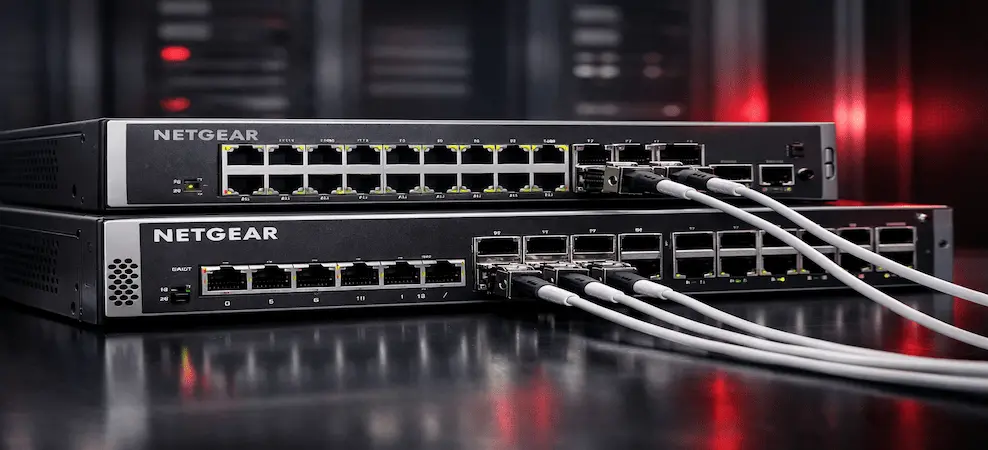
Compare NETGEAR GSM and XSM managed switches. Detailed specs, PoE options, stacking support, and recommendations for SMB and enterprise networks.
1. What Are NETGEAR GSM & XSM Series Managed Switches?
Modern businesses require secure, scalable, and high-performance networking. From VoIP systems to Wi-Fi 6 access points, surveillance cameras, or campus-wide backbone networks, the right managed switch forms the foundation of your IT infrastructure. The Network Switching Subsystem ensures seamless connectivity, optimized traffic flow, and reliable data transmission across all connected devices.
The NETGEAR GSM and XSM series are business-class Layer 2+ managed switches, bridging the gap between entry-level smart switches and high-cost enterprise platforms. Unlike unmanaged switches, they offer:
- VLAN segmentation for department isolation
- Quality of Service (QoS) for prioritized traffic
- Link Aggregation (LAG) for redundancy and higher throughput
- Access Control Lists (ACLs) for security
- PoE/PoE+ power delivery for connected devices
- Fiber uplinks for long-range, high-speed connections
- Stackable architecture (XSM series) for enterprise networks
GSM series is optimized for:
- Small to mid-sized businesses
- Retail and hospitality
- Schools and healthcare clinics
- Surveillance deployments
- Growing IT environments
XSM series is designed for:
- Enterprise access layers
- Campus backbone networks
- High-availability, multi-floor networks
- 10G aggregation environments
Businesses often search for:
- “Best managed switch for WiFi 6”
- “PoE switch for security cameras”
- “48-port gigabit managed switch with uplinks.”
- “Stackable 10G managed switch”
NETGEAR models consistently appear among top-performing options because of their affordable cost-to-performance ratio and enterprise-grade reliability.
2. Deep Dive: GSM Series Switches Explained
GSM4230P-100NAS
- Ports: 24 × Gigabit PoE+ + 6 × SFP uplinks
- Use Case: Medium-sized offices deploying VoIP and Wi-Fi APs
- Why Buyers Choose It: Strong PoE budget, affordable, ideal for edge deployments, and reliable for camera networks
- GSM4248PX-100NAS offers 48 Gigabit PoE+ ports with modular uplinks, ideal for large LANs, schools, and surveillance networks. Delivers reliable power and prevents bandwidth bottlenecks.
Netgear GSM4248PX-100NAS – High-Performance PoE+ Switching for Large Networks
- Ports: 48 × Gigabit PoE+ + Modular uplinks
- Use Case: Large LANs, surveillance-heavy environments, schools, and universities
- Features: Prevents bandwidth bottlenecks for multiple users
GSM4230UP-100NAS
- Type: High-Power PoE++
- Use Case: Wi-Fi 6 APs, PTZ cameras, dense device environments
- Why: Ensures consistent power delivery and traffic management
GSM4212PX-100NAS & GSM4210PX-100NAS
- Type: Compact PoE switches
- Use Case: Small branch offices, retail stores, POS systems, light camera deployments
- Why: Enterprise-grade management without overspending
GSM4248P-100NAS & GSM4248UX-100NAS
- Type: 48-port PoE+/PoE++ switches
- Use Case: Corporate offices, education, healthcare facilities, warehouses
- Why: Broad connectivity for larger office floors
3. XSM Series: Enterprise-Grade Stackable Switching
XSM4348S-100NES
- Ports: 48 × Gigabit + 4 × 10G uplinks
- Features: Stackable, ideal for aggregation, distribution, multi-floor backbones
XSM4344C-100NES
- Features: PoE + stacking + 10G uplinks
- Use Case: Hybrid solution for growing networks
XSM4556-100NAS
- Features: High-performance, scalable, redundant, future-proof bandwidth
- Use Case: Campus networks, corporate HQ, high-availability infrastructure
4. Comparison Table: GSM & XSM Models At a Glance
| Model | Ports | PoE/PoE+ | Uplinks | Stackable | Best Use Case |
| GSM4230P-100NAS | 24 x Gb + 6 x SFP | Yes | SFP Uplinks | No | Mid-size LAN |
| GSM4248PX-100NAS | 48 x Gb + Uplink Slots | Yes | Modular | No | Campus backbone |
| GSM4230UP-100NAS | 24 x Gb + SFP | Advanced PoE | No | PoE-heavy deployments | |
| GSM4212PX-100NAS | 12 x Gb + 4 x SFP | Yes | SFP | No | Small offices |
| GSM4210PX-100NAS | 10 x Gb + 4 x SFP | Yes | SFP | No | Compact networks |
| GSM4248P-100NAS | 48 x Gb | PoE | SFP | No | Gigabit edge |
| GSM4248UX-100NAS | 48 x Gb + Uplink | PoE | Yes | No | Networks needing uplinks |
| XSM4348S-100NES | 48 Gb + 4 10G | No | 10G | Yes | Stackable campus core |
| XSM4344C-100NES | 44 Gb + 4 10G | Yes | 10G | Yes | PoE + stacking |
| XSM4556-100NAS | 48 Gb + 8 10G | Yes | 10G | Yes | Large enterprise |
5. Key Features Explained
PoE vs PoE+
- PoE (802.3af): ~15W per port
- PoE+ (802.3at): ~30W per port — ideal for APs, PTZ cameras, and VoIP phones
- Advanced PoE: Models like GSM4230UP-100NAS provide higher PoE budgets
Uplink Options
- SFP/SFP+ modules provide fiber uplinks for long-distance connections, stacking, and aggregation
Smart Management
- VLAN segmentation, QoS prioritization, ACLs, and RADIUS authentication for traffic optimization and security
Stackability
- XSM models allow physical or distributed stacking, unified management of multiple switches
6. Netgear GSM & XSM vs Competitor Managed Switches
| Feature | NETGEAR GSM / XSM | Cisco Small Business | TP‑Link Omada | D‑Link |
| Ease of Use | Excellent (GUI + CLI) | Good | Average | Average |
| Price Efficiency | Very Competitive | Higher Cost | Competitive | Competitive |
| PoE Power Budget | High (PoE+, PoE++) | Moderate | Moderate | Moderate |
| Advanced Features | Strong (VLAN, QoS, ACLs, stacking) | Strong | Limited | Limited |
| Stacking Support | Supported (XSM Series) | Limited | Not Supported | Not Supported |
7. Why Businesses Prefer NETGEAR Over Competitors
- Cost-effective enterprise-grade features
- No recurring licenses for core functionality
- Intuitive GUI and CLI options
- Strong PoE budgets and stacking options for scalability
8. How to Choose the Right Switch
Ask yourself:
- Number of devices: Plan for 20–30% growth
- PoE requirements: Wi-Fi 6 APs and PTZ cameras need PoE+
- Uplink speed: For high traffic, choose XSM 10G models
- Stacking: Required for centralized management or redundancy
- Expansion: Select modular uplinks for future growth
9. Deployment Best Practices
- Use VLAN segmentation for departments
- Enable QoS for VoIP and streaming
- Configure ACLs for enhanced security
- Implement link aggregation for redundancy and throughput
- Use fiber uplinks for multi-floor/backbone connections
10. Buyer’s Guide Summary
| Scenario | Recommended Switch |
| Small office PoE | GSM4212PX-100NAS |
| Medium office PoE | GSM4230P-100NAS |
| Large LAN | GSM4248P-100NAS |
| High-performance backbone | XSM4348S-100NES |
| Enterprise stackable core | XSM4556-100NAS |
11. Why Buy From a Specialized IT eCommerce Store?
- Authentic products with warranty support
- Fast shipping and global availability
- Technical guidance for configuration and deployment
- Competitive pricing with bulk purchase options
12. Final Thoughts
The NETGEAR GSM and XSM series provide scalable, cost-effective, and feature-rich networking solutions for 2026 and beyond.
Whether upgrading a small office, deploying a large LAN, or building an enterprise backbone, choosing the right switch improves performance, reliability, and ROI.
13. Frequently Asked Questions
Q1: Best NETGEAR PoE switch for security cameras?
A1: GSM4230P-100NAS and GSM4230UP-100NAS due to high PoE budgets.
Q2: Which NETGEAR switches support stacking?
A2: XSM4348S-100NES, XSM4344C-100NES, XSM4556-100NAS
Q3: Are GSM switches compatible with WiFi 6 APs?
A3: Yes. PoE+ capable models support modern APs without injectors.
Q4: Difference between GSM and XSM?
A4: GSM = SMB switches; XSM = stackable, 10G uplink enterprise switches
Q5: Do NETGEAR switches require licenses?
A5: No recurring licenses are needed for core features
Q6: Which switch is ideal for small offices?
A6: GSM4212PX-100NAS or GSM4210PX-100NAS
Q7: Can XSM switches be the backbone for multi-floor offices?
A7: Yes, 10G uplinks + stacking allow backbone deployment
Q8: How to maximize PoE efficiency?
A8: Use high-power devices on dedicated ports, monitor PoE budget
RECENT BLOG POSTS
CATEGORIES
- Laptop Comparisons
- Cisco Switches
- Laptop Comparisons
- Cisco Switches
Contact Us
Send us a Message
Fill out the form below to get started, and a member of our team will contact you as soon as possible