
Networking and Switching: Complete Guide to Network Switches and PoE Network Switches
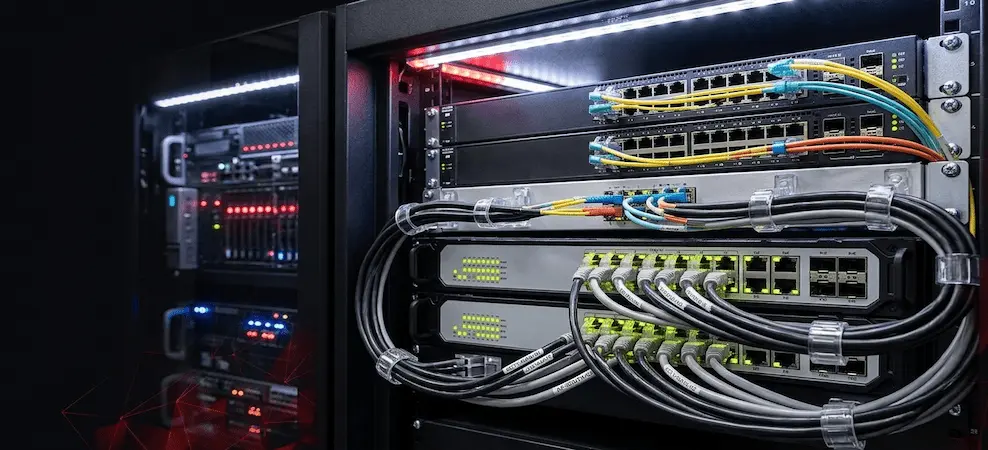
Learn networking and switching basics, how a network switch works, and how PoE network switches power devices efficiently in modern networks.
In today’s connected world, networking and switching play a vital role in businesses, homes, and data centers. From connecting computers to powering IP cameras and access points, network switches, especially PoE network switches, form the foundation of reliable and scalable networks.
This complete guide explains networking basics, how network switches work, and how to build an efficient network with a switch using PoE technology.
What Is Networking and Switching?
Networking refers to connecting multiple devices, such as computers, servers, printers, and smart devices, to share data, resources, and internet access.
Switching is the process of directing data packets efficiently between devices within a network using a network switch.
A well‑designed networking and switching setup improves:
- Network speed
- Security
- Reliability
- Scalability
Types of Computer Networks
Understanding network types helps in designing the right network with a switch.
LAN (Local Area Network)
Connects devices within a limited area, such as an office, home, or building.
WAN (Wide Area Network)
Connects multiple LANs across cities or countries.
MAN (Metropolitan Area Network)
Covers a city or campus, commonly used by universities or ISPs.
PAN (Personal Area Network)
Connects personal devices like smartphones, laptops, and wearables.
What Is a Network Switch?
A network switch is a central networking device that connects multiple devices in a LAN. Unlike hubs, switches intelligently forward data only to the intended device, improving performance and reducing congestion.
When building a network with a switch, all devices communicate through the switch using Ethernet cables.
How Does a Network Switch Work?
Network switches typically operate at Layer 2 (Data Link Layer) of the OSI model, using MAC addresses to identify destination devices.
Advanced Layer 3 switches also perform routing functions between different IP networks.
Key Features of Network Switches
- Multiple Ethernet ports
- Full‑duplex communication
- VLAN support for segmentation
- QoS for traffic prioritization
- Managed and unmanaged options
What Is a PoE Network Switch?
A PoE network switch (Power over Ethernet) delivers both data and electrical power over a single Ethernet cable.
This removes the need for separate power adapters for powered devices.
Typical PoE devices include:
- IP cameras
- Wireless access points
- VoIP phones
- Access control systems
Benefits of PoE Network Switches
Using a PoE network switch offers several advantages:
- Simplified Installation – One cable for data and power
- Cost‑Effective – Reduced electrical wiring and labor costs
- Flexible Deployment – Install devices where power outlets aren’t available
- Centralized Power Management – Monitor and control power from the switch
Types of PoE Network Switches
Choosing the right PoE standard is essential when designing a reliable network with a switch.
Standard PoE (IEEE 802.3af)
- Up to 15.4W per port
- Ideal for VoIP phones and basic access points
PoE+ (IEEE 802.3at)
- Up to 30W per port
- Suitable for PTZ cameras and high‑performance APs
PoE++ / 4PPoE (IEEE 802.3bt)
- 60W to 90W per port
- Used for advanced cameras, digital signage, and IoT devices
How to Build a Network with a Switch
Creating a stable network with a switch involves the following steps:
- Plan the Network Topology
- Choose star, mesh, or hybrid topology based on scale and performance needs.
- Select the Right Network Switch
- Consider port count, speed (1G, 10G, 25G), and PoE power budget.
- Connect Devices
- Use high‑quality Ethernet cables (Cat6 or higher for best performance).
- Configure VLANs
- Segment traffic for better security and performance.
- Monitor and Manage the Network
- Use managed switch features like SNMP, traffic analysis, and monitoring tools.
Managed vs Unmanaged Network Switches
Managed Switch
- VLAN configuration
- QoS and traffic monitoring
- Security controls
- Best for businesses and enterprises
Unmanaged Switch
- Plug‑and‑play
- No configuration needed
- Ideal for small home or office networks
Key Factors When Choosing a Network Switch
Before purchasing, evaluate:
- Port Speed – 1G, 10G, or higher
- Port Count – Number of connected devices
- PoE Requirements – Power needed per device
- Scalability – Support future expansion
- Management Features – Managed vs unmanaged
Common Use Cases for Networking and PoE Switching
- Business Offices – VoIP phones, APs, and IP cameras
- Home Networks – Smart home and multimedia devices
- Data Centers – High‑speed switching and traffic management
- Surveillance Systems – Centralized PoE camera deployment
Conclusion
A strong foundation in networking and switching is essential for building efficient and scalable networks. Whether you’re designing a small office setup or a large enterprise infrastructure, choosing the right network switch or PoE network switch ensures optimal performance, flexibility, and long‑term reliability.
Understanding how to design a network with a switch helps reduce costs, simplify deployment, and future‑proof your network.
Frequently Asked Questions (FAQ)
Q1: What is the difference between a network switch and a router?
A switch connects devices within a local network (LAN), while a router connects different networks and manages internet traffic.
Q2: Can a PoE network switch power all devices?
Only PoE‑compatible devices can be powered. High‑power devices may require PoE+ or PoE++ switches.
Q3: Do I need a managed or unmanaged switch?
Managed switches are ideal for complex networks requiring control and monitoring. Unmanaged switches are best for simple setups.
Q4: Can I connect PoE and non‑PoE devices to the same switch?
Yes. PoE network switches automatically detect and power compatible devices while providing data connectivity to others.
RECENT BLOG POSTS
CATEGORIES
- Laptop Comparisons
- Cisco Switches
- Laptop Comparisons
- Cisco Switches
Contact Us
Send us a Message
Fill out the form below to get started, and a member of our team will contact you as soon as possible