
SFP vs SFP+ vs QSFP28: Key Differences, Speeds, and Use Cases
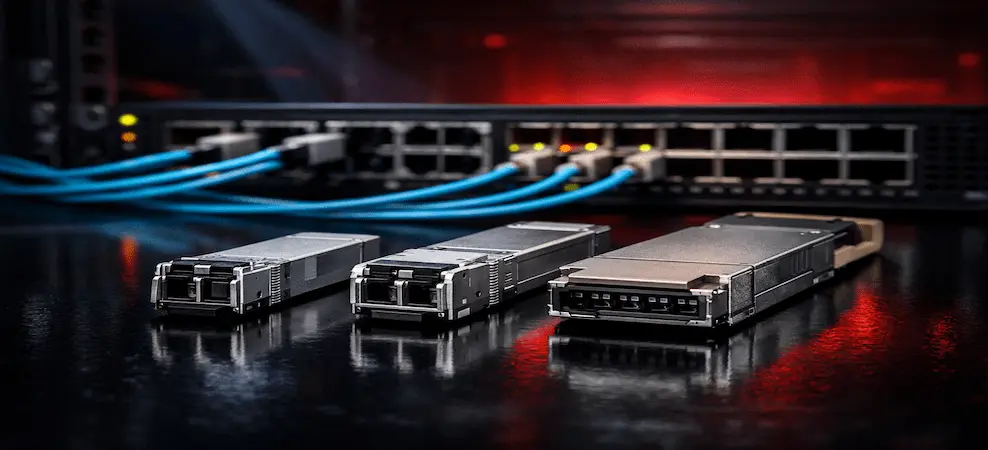
Compare SFP, SFP+, and QSFP28 transceivers by speed, distance, compatibility, and enterprise use cases. Clear technical differences explained.
How PoE Switching and Uplink Transceivers Work Together
Before choosing between SFP, SFP+, or QSFP28 transceivers, it’s important to understand how uplinks relate to modern PoE switch deployments.
In our PoE Switch Buyer’s Guide: Is PoE+ Enough for Wi-Fi 6 and Security Cameras?, we explained how PoE standards like PoE (15.4W), PoE+ (30W), UPOE (60W), and UPOE+ (90W) determine whether a switch can properly power devices such as:
- Wi-Fi 6 and Wi-Fi 6E access points
- PTZ and 4K security cameras
- VoIP phones
- IoT devices
- Building automation systems
However, powering devices is only half of network design.
Once powered, those devices generate traffic, and that traffic must travel through uplinks to aggregation and core switches without creating bandwidth bottlenecks. For more on ensuring reliable performance, see Cisco Switches: The Ultimate Guide for Reliable Networking.
For example:
- A single Wi-Fi 6 access point can exceed 1Gbps in real-world throughput.
- 24 PoE+ access points on one switch can easily generate 10G+ aggregate traffic.
- High-resolution IP cameras streaming continuously can consume significant upstream bandwidth.
If your switch only has 1G uplinks (SFP), but your powered devices generate 10G or more combined traffic, congestion becomes inevitable.
- This is why PoE planning and transceiver selection must be aligned.
- PoE determines how much electrical power each port delivers.
- Uplink transceivers determine how fast traffic exits the switch.
Both impact overall network performance, scalability, and future readiness.
In most enterprise networks:
- Access PoE switches use SFP (1G) or SFP+ (10G) uplinks.
- Aggregation switches typically use SFP+ (10G) or 25G variants.
- Core and data center switches rely on QSFP28 (100G) backbone connectivity.
So even if PoE+ is sufficient to power your Wi-Fi 6 access points and security cameras, your network may still require 10G or 100G uplinks to prevent performance limitations.
What are SFP, SFP+, and QSFP28?
SFP (Small Form-Factor Pluggable)
- Supports 1G Ethernet
- Hot-swappable optical or copper module
- Commonly used for uplinks in switches, routers, and servers
- Ideal for distances from 100m (copper) up to 80km (optical)
SFP+ (Enhanced SFP)
- Supports 10G Ethernet
- Backward compatible with SFP ports (some devices)
- Common in enterprise networks, datacenter access, and server uplinks
- Typical reach: 100m–80km (depending on fiber type)
QSFP28 (Quad SFP 28)
- Supports 100G Ethernet
- High-density module for data centers and aggregation
- Each QSFP28 port can carry 4×25G channels internally
- Used for backbone links, spine-leaf architectures
Citation Summary:
SFP = 1G, SFP+ = 10G, QSFP28 = 100G. Choose based on required bandwidth, distance, and network device compatibility.
Key Differences Between SFP, SFP+, and QSFP28
| Feature | SFP | SFP+ | QSFP28 |
| Max Data Rate | 1G | 10G | 100G |
| Compatibility | Most 1G switches | 10G switches, some 1G | 100G switches / high-speed links |
| Typical Use | Access layer uplinks | Server uplinks, aggregation | Spine/core, high-density data center |
| Hot-Swappable | ✓ | ✓ | ✓ |
| Distance | 100m–80km | 100m–80km | 100m–10km (varies by module) |
| Cost | Lower | Medium | High |
Which Transceiver Should You Buy?
Choosing a transceiver depends on network requirements:
1. For Small Business / Branch Networks
- Bandwidth: < 1G–10G
- Distance: < 100m
- Recommendation: SFP for 1G or SFP+ for 10G uplinks
2. For Enterprise Campus Networks
- Bandwidth: 10G–25G
- Distance: 500m–10km
- Recommendation: SFP+ modules for access and aggregation; QSFP28 for core backbone
3. For Data Centers / High-Speed Backbone
- Bandwidth: 40G–100G
- Distance: < 10km (typical optical)
Compatibility Considerations
- Always check switch port support
- Cisco often requires Cisco-branded or compatible modules
- Ensure distance and fiber type (OM3, OM4, single-mode) matches module
- Consider hot-plug or hot-swap requirements
Commercial Tip:
Buying third-party SFP/SFP+/QSFP28 can save cost, but check vendor compatibility to avoid network instability or downtime.
Common Use Cases
SFP
- Branch office uplinks
- Small access switches
- Low-density fiber connections
SFP+
- Server uplinks (10G)
- Enterprise aggregation
- Fiber uplinks between floors/buildings
QSFP28
- Spine-leaf data center backbone
- High-density aggregation
- 100G campus interconnect
Frequently Asked Questions (FAQs)
What is the difference between SFP and SFP+?
SFP supports 1G Ethernet, while SFP+ supports 10G Ethernet. SFP+ is typically backward compatible with SFP ports.
Can SFP+ be used in an SFP port?
Sometimes, yes, if the switch supports backward compatibility. Check the vendor datasheet.
What is QSFP28 used for?
QSFP28 supports 100G Ethernet and is primarily used in data center backbone links or high-speed aggregation.
Are these transceivers hot-swappable?
Yes. All SFP, SFP+, and QSFP28 modules are hot-swappable.
How do I choose the right transceiver?
Choose based on port speed, network architecture, distance requirements, and device compatibility.
Why is it important to avoid bandwidth bottlenecks when traffic moves through uplinks to aggregation and core switches?
Bandwidth bottlenecks can slow down network performance, cause latency, and impact the efficiency of connected devices. Proper uplink capacity ensures smooth traffic flow, optimal device communication, and reliable overall network performance.
What can I learn from Cisco Switches: The Ultimate Guide for Reliable Networking?
This guide provides insights on configuring, managing, and optimizing Cisco switches for reliable networking. It covers best practices to prevent traffic congestion, enhance network performance, and maintain uptime across aggregation and core layers.
Final Recommendation
- SFP: Best for 1G access-layer connections
- SFP+: Ideal for 10G aggregation and server uplinks
- QSFP28: Necessary for 100G backbone, data center, and high-performance aggregation
Correctly matching transceivers to switches ensures reliable, scalable, and future-proof network deployment.
RECENT BLOG POSTS
CATEGORIES
- Laptop Comparisons
- Cisco Switches
- Laptop Comparisons
- Cisco Switches
Contact Us
Send us a Message
Fill out the form below to get started, and a member of our team will contact you as soon as possible