
How to Select the Right Device: Switch vs Router vs Hub
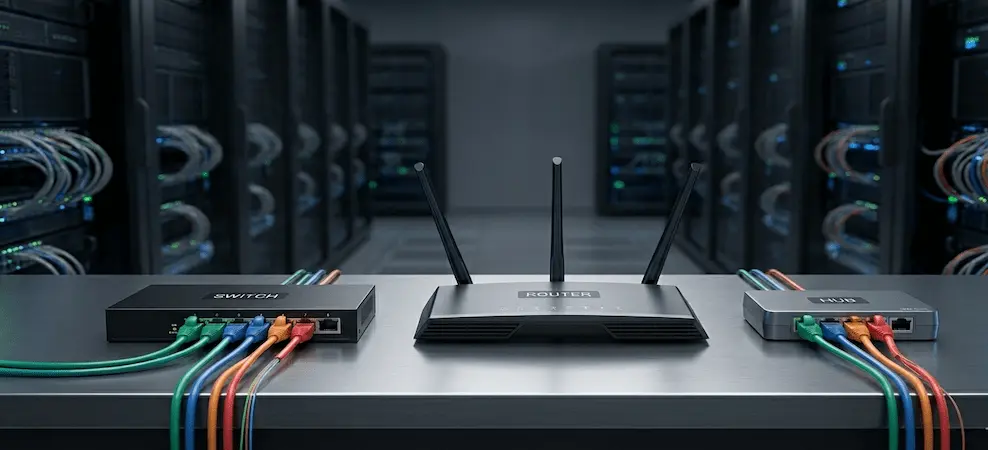
Learn the difference between a switch, router, and hub. Understand how each works and choose the right networking solution for home or office use.
When setting up a home or office network, choosing between a switch, router, or hub can be confusing. These terms, Ethernet switch, network switch, hub, and router, are often used interchangeably, even by network technicians. However, each device performs a distinct role.
This guide explains what each device does, how it works, and how to choose the right one based on your networking requirements.
What’s Inside
- What Is a Switch?
- What Is a Hub?
- What Is a Router?
- Switch vs Hub: Key Differences
- Network Switch vs Router: What’s the Difference?
- Ethernet Switch vs Router Explained
- FAQs: Switches, Routers, and Hubs
What Is a Switch?
A network switch connects devices such as computers, printers, cameras, and servers within a local area network (LAN) and ensures that data reaches the correct destination efficiently.
An Ethernet switch uses multiple Ethernet ports to connect devices and allows them to communicate directly with one another. Switches are the most widely used networking devices in modern networks.
How a Switch Works
- Each connected device has a unique MAC address
- The switch learns these addresses automatically
- Incoming data packets are forwarded only to the intended device
- This prevents unnecessary traffic and improves speed
A switch can also connect to a router, which then provides internet access to all connected devices.
Uses of a Switch
Switches perform several essential networking functions:
- Receiving data packets: Examines packet headers to determine the correct destination
- Packet forwarding: Sends data only to the intended port
- MAC address learning: Identifies and remembers connected devices
- Traffic efficiency: Prevents network congestion by avoiding broadcast flooding
In larger networks, multiple switches may be deployed to support more users while still routing internet access through a router.
What Is a Hub?
A hub is a basic networking device that connects multiple devices on a LAN but operates very differently from a switch.
Hubs function at the physical layer (Layer 1) of the OSI model and do not analyze traffic.
How a Hub Works
- Data received on one port is sent to all ports
- All devices share the same bandwidth
- No traffic filtering or intelligence
Types of Hubs
- Passive Hub
- Simply connects devices without amplifying signals.
- Active Hub
- Amplifies and regenerates signals; requires power.
- Intelligent Hub
- Adds limited management features to monitor traffic and detect issues.
Today, hubs are largely obsolete and replaced by switches due to performance and security limitations.
What Is a Router?
A router connects different networks, most commonly a local network (LAN) to the Internet (WAN).
Routers examine data packets and determine the best path to forward them using IP addresses.
Wireless Router
A wireless router connects to a modem and distributes internet access using:
- Ethernet ports (wired)
- Wi‑Fi (wireless)
Uses of a Router
- Connects LANs to the Internet
- Routes traffic between networks
- Shares a single IP across multiple devices
- Provides firewall protection, access control, and content filtering
- Allows multiple devices (servers, printers, PCs) to communicate securely
Switch vs Hub: What Are the Differences?
| Feature | Switch | Hub |
| Network Layer | Layer 2 | Layer 1 |
| Traffic Direction | To specific device | To all devices |
| Bandwidth Sharing | Dedicated | Shared |
| Performance | High | Low |
| Security | Better | Poor |
A switch intelligently delivers packets only to the destination device, while a hub floods all traffic, slowing performance in busy networks.
Network Switch vs Router: What Is the Difference?
- A switch connects devices within the same network
- A router connects different networks together
Key Distinctions
- Routers use IP addresses
- Switches use MAC addresses
- Routers often include built‑in firewalls
- Switches handle internal data flow efficiently
Ethernet Switch vs Router — Explained Simply
- Ethernet switch: Expands the network and connects devices locally
- Router: Connects your local network to the Internet
Most routers include a small built‑in switch, but for offices or growing networks, dedicated Ethernet switches are preferred for scalability and performance.
An Ethernet switch requires physical (wired) connections, while a wireless router broadcasts Wi‑Fi for mobile devices.
Which Should You Choose?
- Hub: Small, temporary, or legacy setups (not recommended)
- Switch: Homes, offices, printers, cameras, wired devices
- Router: Required for internet access and security
- Switch + Router: Best option for offices and performance‑focused homes
Using a switch instead of a hub reduces latency, improves speed, and enhances reliability, especially with multiple connected devices.
FAQs: Switches, Routers, and Hubs
How does an Ethernet switch work?
It learns device MAC addresses and forwards data only to the intended destination port.
How does a router work?
Routers read IP addresses in data packets and determine the best path to send them between networks.
Can a network switch improve Wi‑Fi signal?
Indirectly. A switch can connect additional access points, improving overall Wi‑Fi coverage.
Who uses Ethernet switches?
Homes, offices, data centers, schools, hospitals, and industrial networks.
How do routers know how many devices are connected?
Routers track devices using DHCP tables, MAC addresses, and IP allocations.
Final Thoughts
Understanding the difference between a switch, router, and hub helps you design a faster, more reliable network.
For most modern setups, a router combined with an Ethernet switch offers the best balance of performance, security, and scalability.
RECENT BLOG POSTS

CATEGORIES
- Laptop Comparisons
- Cisco Switches
- Laptop Comparisons
- Cisco Switches
Contact Us
Send us a Message
Fill out the form below to get started, and a member of our team will contact you as soon as possible