
SSD vs HDD: Differences, Performance, and Use Cases Explained
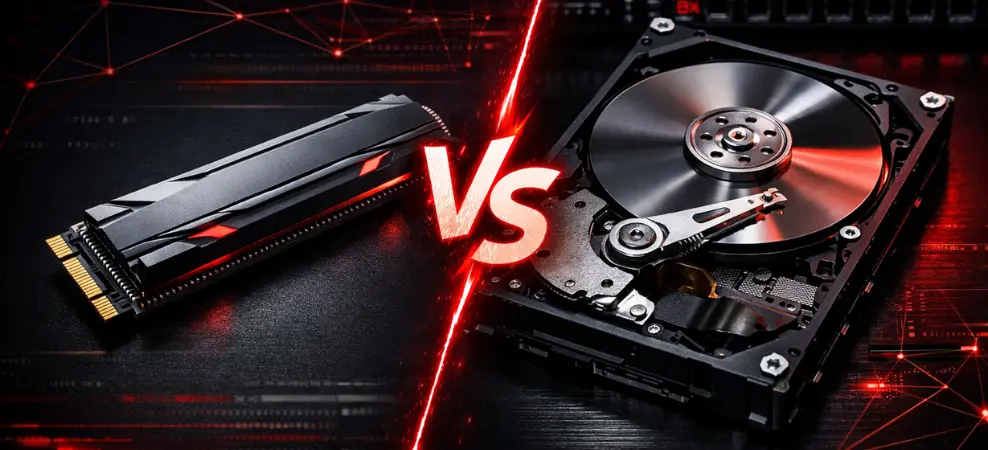
Learn the key differences between SSDs and HDDs including speed, durability, cost, and ideal use cases for modern storage needs.
SSD vs HDD in 2026: Speed, Lifespan, Gaming, External Drives & Real-World Performance Compared
Storage is the backbone of every computing experience. Whether you’re building a gaming PC, upgrading a business desktop, replacing a laptop drive, or buying portable storage, the question remains:
SSD vs HDD — which should you buy in 2026?
The marketplace has evolved. Game sizes exceed 100GB. 4K and 8K video editing is common. Cloud backups sync continuously. Users demand instant performance, but budgets still matter.
In this complete guide, we compare:
- SSD drive vs HDD speed
- HDD platter rotation speed vs SSD electronic circuits
- HDD vs SSD for gaming
- External SSD vs HDD reliability
- Lifespan & endurance
- Data recovery differences
- SMR drive vs SSD for cold storage
- Real-world performance benchmarks
1. What Is the Difference Between HDD and SSD?
HDD (Hard Disk Drive): Mechanical Storage
An HDD uses spinning magnetic platters. A mechanical read/write head moves across the disk surface to access data.
This is why HDD performance depends on:
- Platter rotation speed (5400 RPM vs 7200 RPM)
- Seek time
- Mechanical latency
HDD Platter Rotation Speed vs SSD Electronic Circuits
An HDD physically spins like a miniature record player.
An SSD uses NAND flash memory and electronic circuits — no movement.
This is the core reason SSD vs HDD speed is dramatically different.
Advantages of HDD
- Lowest cost per terabyte
- 4TB–20TB+ capacity options
- Ideal for archives, CCTV, and NAS
- Strong option for cold storage
Disadvantages of HDD
- Slower performance
- Vulnerable to shock
- Mechanical wear
- Audible noise
- Higher heat output
SSD (Solid State Drive): Electronic Storage
An SSD stores data in flash memory chips. No moving parts. No spinning disks.
Advantages of SSD
- Extremely fast read/write speeds
- Silent operation
- Shock resistant
- Low power consumption
- Ideal for OS, gaming, and productivity
Disadvantages of SSD Over HDD
- Higher price per GB
- Limited write cycles (TBW rating)
- High-capacity models cost more
2. SSD Drive vs HDD Speed
Here’s how SSD vs HDD compares in real-world performance:
| Drive TypeAverage Speed | |
| HDD | 80–160 MB/s |
| SATA SSD | 450–550 MB/s |
| NVMe PCIe 3.0 SSD | 2,500–3,500 MB/s |
| NVMe PCIe 4.0/5.0 SSD | 5,000–10,000+ MB/s |
NVMe SSDs connect directly through PCIe lanes, bypassing SATA limitations.
What Faster Speed Means
- Windows boots in 5–10 seconds (vs 30–90 seconds on HDD)
- Games load dramatically faster
- 4K video transfers in seconds
- Zero mechanical lag
- Smooth multitasking
In 2026, NVMe SSDs are the modern performance standard.
3. SSD vs HDD Loading Times for Specific Game Titles
Let’s look at gaming with SSD vs HDD:
Example (100GB Open-World Game):
| ScenarioHDDNVMe SSD | ||
| Initial Load | 60–120 sec | 15–25 sec |
| Fast Travel | Noticeable delay | Near instant |
| Texture Streaming | Pop-in visible | Smooth |
| Map Rendering | Slower | Immediate |
While FPS does not increase, SSD vs HDD for gaming changes the experience dramatically.
4. HDD vs SSD for Gaming in 2026
Does SSD Improve FPS?
No — FPS depends on GPU and CPU.
What SSD Improves:
- Load times
- Fast travel
- Texture streaming
- Open-world asset loading
- Reduced stuttering
HDD vs SSD for Gaming Verdict:
Gaming in 2026 practically requires an SSD.
HDDs struggle with modern game asset streaming. NVMe SSDs provide seamless gameplay.
5. External SSD vs HDD (Portability & Durability)
When choosing external storage, the external SSD vs HDD comparison becomes critical.
External HDD
- Best for large, cheap backups
- Good for stationary environments
- Lower cost per TB
But:
- Easily damaged if dropped
- Slower transfers
- Heavier and bulkier
External SSD
- Shock resistant
- Compact and lightweight
- Fast USB-C transfers
- Ideal for creators & travelers
External HDD vs External SSD Summary
External SSD = Speed + Durability
External HDD = Budget + Capacity
If you travel or work in the field, external SSD vs HDD is not even close — SSD wins.
6. Lifespan: Which Lasts Longer — SSD or HDD?
This is one of the most searched questions in the HDD vs SSD debate.
HDD Lifespan
- 3–7 years typical
- Mechanical failures possible
- Sensitive to heat & vibration
SSD Lifespan
- Rated in TBW (Terabytes Written)
- 5–10+ years typical use
- No moving parts
- Better shock resistance
Most users will never exceed SSD write endurance limits.
Which Lasts Longer?
For daily usage, SSD is generally more reliable.
For cold storage, HDD may last longer if rarely powered on.
7. SMR Drive vs SSD for Cold Storage
SMR (Shingled Magnetic Recording) drives are optimized for high-capacity storage at lower cost.
Best for:
- Backups
- Archives
- Rarely accessed data
Not ideal for:
- Heavy write workloads
- Gaming installs
- OS usage
For cold storage, SMR drive vs SSD often favors HDD for cost efficiency.
8. How to Recover Data from Damaged SSD vs HDD
Another key difference:
Data Recovery from HDD
- Data remains magnetically stored
- Specialists can replace read heads
- Often recoverable after partial failure
Data Recovery from SSD
- TRIM may permanently erase data
- Controller failure complex
- Chip-level recovery required
Important Tip:
If SSD data is accidentally deleted, power off immediately to increase recovery chances.
HDD recovery is often easier than SSD recovery.
9. Real-World Everyday Performance
Opening browser:
- HDD: 3–5 seconds
- SSD: Instant
System Boot:
- HDD: 30–90 sec
- SSD: 5–10 sec
Installing software:
- HDD: Noticeable delay
- SSD: Smooth & responsive
This is why upgrading from HDD to SSD is the single biggest PC performance improvement.
10. What Should You Buy in 2026?
Everyday Users
- 1TB SATA SSD (budget)
- 1TB NVMe SSD (ideal)
Gamers
- 1TB–2TB NVMe SSD
- Optional HDD for old games
Creators
- 2TB+ NVMe SSD
- HDD/NAS for archives
Businesses
- Enterprise SSD (rated TBW)
- HDD for long-term backups
Students & Travelers
- External SSD
- External HDD for home backup
11. Final Verdict: SSD vs HDD in 2026
Let’s answer clearly:
- SSD is better for 95% of users
- HDD remains useful for large, low-cost storage
- NVMe SSD is the modern performance standard
- External SSD vs HDD heavily favors SSD for portability
- Hybrid setup gives best value
Recommended Setup
1TB NVMe SSD + 4TB HDD
This delivers:
- Speed
- Capacity
- Longevity
- Excellent cost-to-performance balance
Frequently Asked Questions (SSD vs HDD – 2026)
1. SSD vs HDD: Which is better in 2026?
In the SSD vs HDD comparison, SSD is better for speed, durability, and everyday performance. HDD is better only for large, low-cost storage. For most users in 2026, SSD is the recommended primary drive, while HDD works well for backups and archives.
2. What is the difference between an SSD drive vs HDD speed?
The speed difference between SSD and HDD is significant. HDDs typically operate at 80–160 MB/s due to mechanical platter rotation speed, while SATA SSDs reach 500 MB/s and NVMe SSDs exceed 5,000 MB/s. SSDs use electronic circuits instead of spinning disks, resulting in much faster data access.
3. HDD vs SSD for gaming: Which performs better?
When comparing HDD vs SSD for gaming, SSD clearly delivers a better experience. While FPS remains dependent on CPU and GPU, SSD vs HDD for gaming impacts loading times, texture streaming, and open-world performance. Modern games are optimized for SSD storage.
4. Does gaming with SSD vs HDD affect loading times?
Yes. Gaming with SSD vs HDD dramatically affects loading times. SSD vs HDD loading times for specific games can differ by 30–60 seconds. NVMe SSDs reduce fast travel delays, eliminate texture pop-in, and provide smoother gameplay transitions.
5. External SSD vs HDD: Which is more reliable?
In the external SSD vs HDD comparison, SSDs are more durable and shock-resistant. External HDD vs SSD differences include mechanical vulnerability; HDDs can fail if dropped. External SSD vs HDD is ideal for travel and creative professionals, while HDD is suitable for stationary backup storage.
6. Which lasts longer: SSD or HDD?
When analyzing HDD vs SSD lifespan, SSDs typically last 5–10+ years under normal use due to no moving parts. HDDs may last 3–7 years but are vulnerable to mechanical wear. For daily use, SSD is generally more reliable.
7. How to recover data from a damaged SSD vs HDD?
Recovering data from a damaged SSD vs. an HDD differs significantly. HDD data recovery is often easier because data remains magnetically stored on platters. SSD recovery can be difficult due to TRIM and controller failures. For important data, regular backups are essential.
8. Is an SMR drive better than an SSD for cold storage?
In the SMR drive vs SSD comparison for cold storage, SMR HDDs are more cost-effective for large archival storage. SSDs are better for active workloads and frequent access. For rarely accessed backups, SMR HDD is usually the economical choice.
RECENT BLOG POSTS
CATEGORIES
- Laptop Comparisons
- Cisco Switches
- Laptop Comparisons
- Cisco Switches
Contact Us
Send us a Message
Fill out the form below to get started, and a member of our team will contact you as soon as possible