
What Is a KVM Switch and How Does It Work?
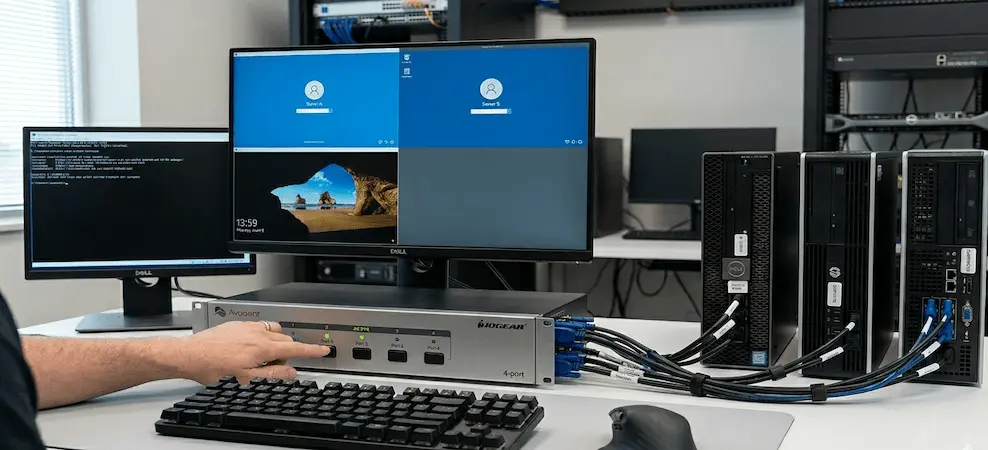
Learn what a KVM switch is, how it works, why you need one, and how to choose the best KVM switch, including dual monitor and KVM-over-IP options.
Why KVM Switches Matter Today
As businesses, IT professionals, data centers, creators, and home offices increasingly rely on multiple computers and servers, managing them efficiently has become essential. Whether you’re juggling workstations, maintaining servers, or running a hybrid IT environment, switching between keyboards, mice, and monitors can be inefficient, costly, and error‑prone.
This is where KVM switches come in.
A KVM switch (Keyboard, Video, Mouse) allows you to control multiple computers using a single set of peripherals, saving time, space, and money while significantly improving productivity. From dual monitor KVM switches for creative professionals to KVM-over-IP switches for enterprise server rooms, these devices are foundational in modern IT infrastructure.
What Is a KVM Switch?
A KVM switch is a hardware device that enables a user to control multiple computers from a single keyboard, monitor, and mouse. Instead of physically unplugging peripherals from one computer and plugging them into another, a KVM switch lets you change systems instantly, usually with a button press, keyboard shortcut, or web-based interface.
KVM stands for:
- K – Keyboard
- V – Video (monitor)
- M – Mouse
Modern KVM switches often support:
- Audio
- USB peripherals
- Multiple monitors
- High resolutions (4K, 8K)
- Network-based access (KVM-over-IP)
What Is a KVM Switch Used For?
KVM switches are used across a wide range of environments:
1. IT & Data Centers
System administrators use KVM switches to manage multiple servers efficiently, especially when rack space and access need to be minimized.
2. Offices & Corporate Environments
Businesses use KVM switches to:
- Share workstations
- Reduce desk clutter
- Improve hot-desking setups
- Enhance security by limiting physical access
3. Home Offices & Power Users
Remote workers, developers, finance professionals, and engineers benefit from:
- Seamlessly switching between work and personal systems
- Managing test machines or labs
- Reducing hardware redundancy
4. Creative & Engineering Workflows
Designers and video editors rely on dual monitor KVM switches to work across systems without losing visual clarity or performance.
What Does a KVM Switch Do?
At its core, a KVM switch:
- Routes keyboard, mouse, and video signals
- Allows instant switching between computers
- Eliminates the need for duplicate peripherals
- Supports centralized control
- Enhances security and access control
Advanced models may also:
- Enable BIOS-level access
- Allow remote operation
- Support cascading for large port counts
- Log user activity in secure environments
How Does a KVM Switch Work?
A KVM switch works by acting as a signal manager between peripherals and connected computers.
Step-by-Step Operation:
- Computers Connect to the KVM Switch
- Each computer connects using dedicated KVM cables (USB + HDMI/DP/DVI/VGA).
- Peripherals Connect Once
- Your keyboard, mouse, monitor(s), speakers, and USB devices connect to the KVM switch.
- Signal Switching
- When you press a switch button or hotkey, the KVM reroutes peripheral signals to the chosen computer.
- Instant Control
- The selected computer becomes active while others pause input without losing system state.
For KVM-over-IP switches, signals are compressed and transmitted over a network, allowing remote control via browser or client software.
Types of KVM Switches
1. Desktop KVM Switches
- Ideal for home or small office
- 2–4 ports typically
- Plug-and-play convenience
2. Rackmount KVM Switches
- Used in data centers
- 8, 16, 32, or more ports
- Cascade capable
3. Dual Monitor KVM Switches
- Supports two displays per computer
- Essential for traders, designers, and developers
- Maintains high resolutions and refresh rates
4. KVM-Over-IP Switches
- Enables remote access over LAN/WAN
- BIOS-level control even when the OS fails
- Essential for enterprise, colocation, and cloud providers
Dual Monitor KVM Switch: Why It Matters
A dual monitor KVM switch allows each connected computer to output to two monitors, preserving extended desktop setups when switching systems.
Benefits:
- Seamless multi-screen productivity
- No need to reconfigure displays
- Full resolution and refresh rate support
- Time savings for power users
This is especially critical for:
- Financial trading desks
- Software development
- 3D modeling and CAD
- Video editing and broadcast operations
What Are KVM-Over-IP Switches?
KVM-over-IP switches allow users to control computers remotely over a network, rather than being physically present.
Key Advantages:
- Access systems from anywhere
- Manage headless servers
- Reduce on-site staffing costs
- Improve disaster recovery readiness
Common Use Cases:
- Data centers
- Global IT operations
- Secure government installations
- Industrial automation systems
Why You Need a KVM Switch
1. Increased Productivity
Switch between systems instantly without unplugging hardware.
2. Cost Savings
Eliminate the need to buy duplicate monitors, keyboards, and mice.
3. Cleaner Workspaces
Reduce cable clutter and hardware footprint.
4. Operational Efficiency
Centralized control improves troubleshooting and management.
5. Enhanced Security
Limit physical access to sensitive machines.
How to Choose the Best KVM Switch
Finding the best KVM switch depends on your specific needs.
Key Buying Factors:
1. Number of Ports
- 2–4 ports for desks
- 8–64 ports for server rooms
- Cascading options for scalability
2. Display Support
- Single or dual monitor KVM switch
- Resolution: 1080p, 4K, 8K
- HDMI, DisplayPort, DVI, VGA
3. USB Compatibility
- USB 2.0 vs USB 3.0
- HID emulation support
4. Switching Method
- Push buttons
- Keyboard hotkeys
- Web interface (KVM-over-IP)
5. Environment
- Desktop vs rackmount
- Local-only vs remote access
- Enterprise security needs
Best KVM Switch Use Cases by Industry
| Industry | Recommended KVM Type |
| Data Centers | Rackmount KVM-over-IP |
| Home Office | Desktop KVM switch |
| Finance | Dual monitor KVM switch |
| Government | Secure encrypted KVM |
| Broadcast | High-resolution KVM |
FAQs About KVM Switches
What Is a KVM Switch?
A KVM switch is a hardware device that allows one keyboard, monitor, and mouse to control multiple computers.
What Is a KVM Switch Used For?
It’s used to manage multiple systems efficiently in offices, data centers, and technical environments.
How Does a KVM Switch Work?
It switches peripheral signals between computers using hardware or network-based routing.
What Does a KVM Switch Do?
It simplifies system management, improves productivity, and reduces hardware costs.
Why Do You Need a KVM Switch?
If you use more than one computer, a KVM switch saves time, space, and money.
What Is the Biggest KVM Port Switch Made in the USA?
Some enterprise-grade manufacturers produce high-port-count KVM switches (32 to 64 ports) made or assembled in the USA for secure industries. These systems often support:
- Cascading up to hundreds of servers
- KVM-over-IP functionality
- FIPS and government compliance
- Rackmount architecture
These are commonly used in defense, intelligence, healthcare, and mission-critical infrastructure environments.
Future of KVM Switch Technology
KVM technology continues to evolve with:
- Higher resolutions (8K, beyond)
- Full matrix switching
- Zero-latency IP KVM
- Cloud-integrated access models
- Enhanced encryption and audit logging
As hybrid work and data center complexity increase, KVM switches remain a critical control layer.
Final Thoughts: Choosing the Right KVM Switch
Whether you’re looking for a dual monitor KVM switch for your desk, a KVM-over-IP switch for enterprise operations, or simply the best KVM switch for productivity, investing in the right solution pays off in efficiency, reliability, and scalability.
RECENT BLOG POSTS
CATEGORIES
- Laptop Comparisons
- Cisco Switches
- Laptop Comparisons
- Cisco Switches
Contact Us
Send us a Message
Fill out the form below to get started, and a member of our team will contact you as soon as possible