
Cisco C9300‑48T‑A Switch: Architecture, Specifications, and Campus Use Cases
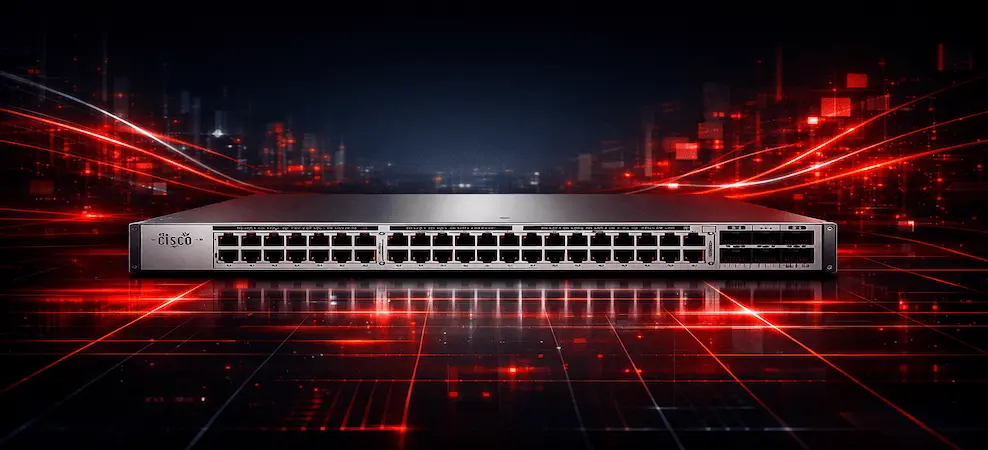
Buy Cisco C9300-48T-A 48-port PoE+ switch for secure, scalable campus networks. Ideal for enterprise access layers & KVM-managed IT.
The Cisco C9300-48T-A is a powerful enterprise access-layer switch built for modern campus networks that demand reliability, security, and scalability. Designed as part of Cisco’s Catalyst 9300 Series, this switch plays a critical role in the network switching subsystem, delivering consistent performance for business-critical environments.
If you’re upgrading your infrastructure or building a future-ready campus network, the C9300-48T-A switch offers the stability and flexibility enterprises expect from Cisco.
What Is the Cisco C9300-48T-A?
The C9300-48T-A (c9300 48t a) is a 48-port Gigabit Ethernet switch engineered for enterprise access networks. It supports advanced networking and switching requirements while maintaining high availability and simplified management.
Unlike entry-level or unmanaged switches, the C9300-48T-A is purpose-built for:
- Campus access layers
- Enterprise wiring closets
- Secure business networks
- Scalable switching environments
Why the C9300-48T-A Is Ideal for Campus Access Switching
Campus networks connect hundreds or thousands of endpoints daily. The Cisco C9300-48T-A ensures stable connectivity across users, servers, and network devices.
Key Benefits
- Enterprise-grade access switching reliability
- Seamless integration into Cisco-based ecosystems
- Designed for long-term scalability
- Optimized for modern network switching subsystems
This makes it a preferred alternative to basic PoE network switches when advanced control and uptime matter.
Role in the Network Switching Subsystem
A network switching subsystem forms the backbone of enterprise connectivity. The C9300-48T-A functions as the access layer, bridging endpoints to the core network while enforcing policies and maintaining performance.
In real-world deployments, it supports:
- Business applications
- Wireless access points
- Security appliances
- VoIP and endpoint connectivity
Why Enterprises Pair Cisco Switches with KVM Switches
Even the best switches require direct hardware access. That’s where KVM switches become essential.
What Is a KVM Switch?
A KVM switch (Keyboard, Video, Mouse) allows IT teams to control multiple network devices from a single console.
Common KVM Switch Types Used with Cisco Switches
- USB KVM switch – Small IT rooms and labs
- Dual monitor KVM switch – NOCs and operations teams
- KVM-over-IP switches – Remote enterprise management
- Datacenter KVM switch – Large-scale infrastructure
Using the best KVM switch with a Cisco C9300-48T-A ensures:
- Faster troubleshooting
- Secure console-level access
- Reduced downtime during outages
Cisco Campus Switch Comparison Table
| Feature | Cisco C9300-48T-A | Cisco Catalyst 9200 | Cisco Catalyst 9300L |
| Series | Catalyst 9300 | Catalyst 9200 | Catalyst 9300L |
| Target Deployment | Large enterprise & campus networks | SMBs & branch offices | Cost-optimized enterprise campuses |
| Ethernet Ports | 48 × 1G Ethernet | 24 / 48 × 1G Ethernet | 24 / 48 × 1G Ethernet |
| PoE Support | PoE / PoE+ | PoE / PoE+ | PoE / PoE+ |
| Uplink Type | Modular uplinks | Fixed uplinks | Fixed uplinks |
| Stacking Technology | Full StackWise | Limited stacking | StackWise-160 |
| Switching Capacity | High enterprise throughput | Moderate | Moderate to high |
| Layer Support | Advanced Layer 2 & Layer 3 | Layer 2 / basic Layer 3 | Advanced Layer 2 & Layer 3 |
| Security Features | TrustSec, MACsec, segmentation | Standard enterprise security | Advanced enterprise security |
| Operating System | Cisco IOS XE | Cisco IOS XE | Cisco IOS XE |
| Scalability | Excellent – future-ready | Basic to moderate | Good |
| Management Use Case | Core campus access layer | Branch access switching | Enterprise access at a lower cost |
| Ideal Buyer | Universities, hospitals, large enterprises | Small IT teams & branches | Enterprises balancing cost & performance |
Who Should Buy the Cisco C9300-48T-A?
This switch is ideal for:
- Enterprises upgrading legacy campus networks
- Businesses standardizing Cisco networking
- Data centers extending campus access layers
- IT teams need reliable access to the switching
Paired with a dual monitor KVM switch or KVM-over-IP switch, it delivers full operational control.
Quick Buying Recommendation:
- Cisco C9300-48T-A: Ideal for maximum performance, modular uplinks, advanced security, and long-term scalability. Perfect for large enterprise networks.
- Catalyst 9200: Best for cost-effective deployments in branch offices or SMBs, offering essential enterprise features at a lower price.
- Catalyst 9300L: Offers enterprise-grade features at a reduced cost, suitable when modular uplinks are not required.
Final Verdict: Is the Cisco C9300-48T-A Worth It?
If your goal is reliable campus access switching, the Cisco C9300-48T-A is a proven enterprise solution. It integrates seamlessly into modern networking and switching environments and supports long-term scalability.
For best results, combine it with a datacenter KVM switch to ensure uninterrupted access and simplified management.
Frequently Asked Questions
What is a KVM switch?
A KVM switch allows one keyboard, monitor, and mouse to control multiple devices, such as switches and servers.
What does a KVM switch do?
It provides centralized, direct access to connected hardware for configuration and troubleshooting.
How does a KVM switch work?
It electronically switches control signals between devices using physical or IP-based connections.
What is a KVM switch used for?
KVM switches are used in data centers, server rooms, and enterprise networks to manage multiple devices efficiently.
Why do you need a KVM switch?
KVM switches reduce hardware clutter, improve operational efficiency, and provide access during network failures.
What is the biggest KVM port switch made in the USA?
Enterprise datacenter KVM switches can support 32, 64, or more ports, depending on the manufacturer and model.
RECENT BLOG POSTS
CATEGORIES
- Laptop Comparisons
- Cisco Switches
- Laptop Comparisons
- Cisco Switches
Contact Us
Send us a Message
Fill out the form below to get started, and a member of our team will contact you as soon as possible